RSS a 66 redes sociales: Facebook, Instagram, X, LinkedIn, Telegram y más Blog Afiliados Contactos
Iniciar sesión Empezar gratis
Updated: 2026-09-29
AUTO Post Your Website or Blog with PostRSS: How to Put Your Social Media Growth on Autopilot
Social networks are an inseparable helper when it comes to attracting massive traffic to your website, gaining the trust of your audience, and building a loyal base of subscribers. The size and engagement of your online community directly reflect the value and importance of the content you share. Furthermore, consistent social signals and steady referral traffic play an essential role in improving your blog or website's overall page rank and search engine visibility. [1, 2, 3]
However, maintaining a manual presence across multiple dashboards is incredibly exhausting. The solution is simple: social media automation. By closing the gap between your website's backend and your public channels, you can keep your streams active 24/7 without lifting a finger.

The Power of RSS-Driven Automation

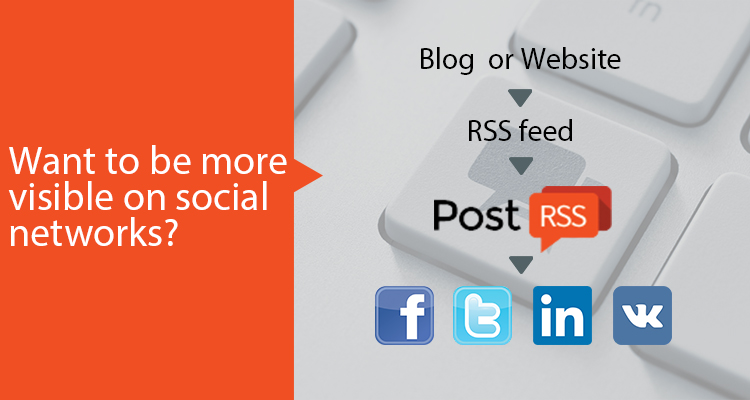
An RSS or Atom feed acts as a continuous digital broadcasting system for your online platform. Every single time you push a new article, news flash, or product update live, your feed updates itself instantly.
PostRSS.com taps into this automated flow to completely streamline your publishing workflows. Instead of copying and pasting links all day long, our cloud system constantly monitors your feed in the background. The exact second new content is detected on your site, PostRSS dynamically generates native social posts and distributes them straight to your connected profiles. [1, 2]

Connect the Platforms That Matter Most

Reaching your target audience requires a native presence across several professional and casual ecosystems simultaneously. PostRSS allows you to broadcast your content across all major global networks with zero friction:
  • Facebook Pages: Keep your fan pages thoroughly updated without daily manual tracking.
  • X (formerly Twitter): Share rapid micro-updates and ride the wave of trending real-time search traffic instantly.
  • LinkedIn Profiles & Pages: Cultivate B2B authority by sharing corporate news, whitepapers, and industry deep-dives.
  • Pinterest Boards: Auto-extract your featured visual assets to capture permanent, high-converting discovery traffic.
  • VKontakte Communities: Target international demographics smoothly by pushing updates directly to walls and groups.

Why Top Content Creators Automate with PostRSS

Moving from manual interaction to systematic content syndication offers game-changing benefits for your modern digital marketing strategy:
  1. Complete Control and Flexibility: PostRSS is an extremely simple tool that offers deep customization. You can easily adjust advanced settings such as maximum posts per update, publishing order, dynamic message formats, and custom posting frequencies. You can even choose the exact date you want the engine to start tracking your historical feed data. [1, 2, 3]
  2. True Native Media Previews: Our platform does not just dump unformatted text links into your channels. It renders beautiful rich-media previews with proper titles, clear snippets, and full-resolution graphics so that your automated output looks perfectly tailored and organic.
  3. Massive Operational Scalability: Tailored for both personal brands and large enterprises, our infrastructure allows you to post from 50 to 250 million automated tasks per month across various CSV files and RSS links, giving you unlimited growth potential.

How to Get Started in Less Than 5 Minutes

You do not need any development background or coding experience to begin optimizing your daily schedule. Preparing your automated pipeline is straightforward:
  • Step 1: Paste your website's primary RSS, Atom, or CSV link into your central PostRSS dashboard.
  • Step 2: Safely authorize your target business pages, profiles, or community groups.
  • Step 3: Fine-tune your publishing rules, apply custom hashtags, and hit activate. [1, 2]

What to Check Before You Switch It On

Automation copies whatever your feed contains, so a few minutes of preparation pays off for every post that follows:

  • Images: PostRSS takes the picture from the feed item or from the page’s Open Graph tags. Make sure your articles have a featured image or an og:image tag, so every post carries a real picture.
  • Message format: choose one of the nine formats built from the item title, the item description, the page title or your own static text. A short title with a link suits fast networks; a title plus description suits Facebook Pages and blogs.
  • Filters: if the feed mixes topics, use include or exclude keywords so only relevant items go to each account.
  • Tracking: add your own query parameters such as utm_source=postrss to every link, so your analytics shows what each network brings.

Your feed is checked every 5 minutes on all plans, including Free, and every minute on Enterprise plans. The full list of options is on the features page, and the networks included in each plan are on the pricing page.

Growing Beyond One Account

Most websites start with a single Facebook Page and add networks later. One feed can be connected to several targets at once, and each target keeps its own settings: a different message format, its own keyword filters, its own posting windows on paid plans. That makes it easy to post every article to your Facebook Page while sending only selected topics to a specialist community or a team chat.

If you run several sites or product lines, add each feed as a separate source and route it to the accounts that fit its audience. When you need more targets or more network types, you can move to a larger plan that includes them.

PostRSS ensures your social media visitors always stay engaged with up-to-date content, allowing you to spend your irreplaceable time on the most critical tasks of your business and life!


FAQ

Do I need to write code to auto-post my website?

No. You paste your feed address, connect an account and PostRSS does the rest. WordPress users can also install the official PostRSS plugin, which builds the feed and creates the targets for them.

How quickly does a new article appear on social media?

PostRSS checks each feed every 5 minutes on all plans and every minute on Enterprise plans, so a new article usually appears within minutes of going live on your site.

Can I start for free?

Yes. The Free plan posts to one Facebook Page with 10 posts per month. Paid plans from Start to Enterprise add more posts, more targets and more networks.

Can PostRSS also share my older articles?

Yes. Pick the date to start from and turn on catch-up, and PostRSS also posts older feed items that were never published.

New guides, once a month

What changed in the networks, what broke, and how to fix it before it costs you reach.

We send a confirmation e-mail first. Unsubscribe any time.
PostRSS: automatización de feeds RSS y auto-publicación
Resumen de privacidad

Este sitio web utiliza cookies para que podamos brindarle la mejor experiencia de usuario posible. La información de las cookies se almacena en su navegador y realiza funciones como reconocerlo cuando regresa a nuestro sitio web y ayudar a nuestro equipo a comprender qué secciones del sitio web le resultan más interesantes y útiles.
