WordPress Plugin Feed

This tag covers how WordPress feed-related plugins interact with RSS-based automation tools like PostRSS, and what to check if a plugin is altering the site's default feed output. WordPress generates a default RSS feed automatically at /feed/ for every site, and PostRSS connects to that native feed directly, so no additional on-server plugin is needed and the site's own performance is unaffected. Because PostRSS runs its feed checks in the cloud rather than on the WordPress server itself, it avoids the resource drain that some self-hosted auto-posting plugins introduce during high-traffic periods. PostRSS can be pointed at a category-specific or tag-specific WordPress feed URL rather than the site-wide feed, which allows automating posting for only certain types of content. Some SEO, caching, or content-restriction plugins can modify what appears in a WordPress feed, which can affect how PostRSS formats the resulting automated posts. Articles here help diagnose feed-related issues that trace back to a specific WordPress plugin.
Post Automatically RSS Feeds to Social Networks with the PostRSS Tool
Actualizat: 20.08.2026

Updated: 2026-08-20 Manually sharing every new website update across multiple social profiles is an ineffective use of ...

Citește mai mult »
Auto Post WordPress and Blog RSS Feed to Facebook, X, LinkedIn, and VKontakte
Actualizat: 2026-08-30

Updated: 2026-08-20 If you run a WordPress website or a professional blog, consistently promoting your new content on s...

Citește mai mult »
Post Your RSS Feeds Easier and Faster Than Ever
Actualizat: 2026-08-30

Updated: 2026-08-20 Managing multiple social media accounts while regularly publishing fresh content on your website ca...

Citește mai mult »
How to Connect Official PostRSS Apps to Securely Auto-Post to Major Social Networks
Actualizat: 2026-08-30

In the world of social media automation, security and ease of use are paramount. To broadcast your website’s RSS or Atom ...

Citește mai mult »
Which PostRSS Plan Supports Which Platform? A Clear 2026 Breakdown
Actualizat: 2026-08-30

Updated: 2026-08-20 This post originally announced, back in December 2016, that PostRSS's Start and Professional pl...

Citește mai mult »
How to Increase Your Sales Automatically Using E-Commerce RSS Syndication
Actualizat: 2026-08-30

Updated: 2026-08-20 For e-commerce store owners, digital marketers, and product creators, driving consistent revenue is...

Citește mai mult »
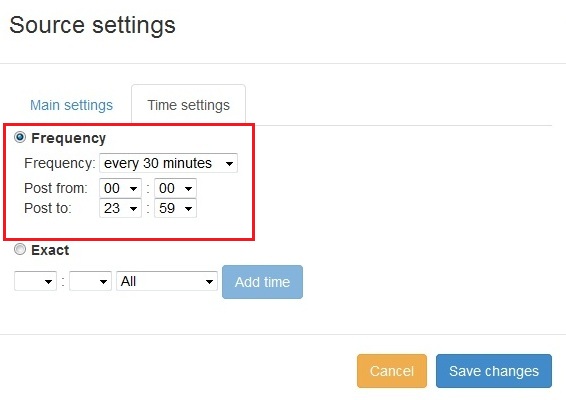
Funcție nouă adăugată în PostRSS: Selecția avansată a orei de postare
Actualizat: 11.11.2015

  New feature added to PostRSS Advanced posting time selection. No source from Advanced time settings Possible to add i...

Citește mai mult »

Cum să vă sincronizați contul de social media cu aplicațiile PostRSS?
Actualizat: 03.11.2015

We receiving many questions: How to synchronize social my accounts? I am don't see my Facebook page in listings? How po...

Citește mai mult »
PostRSS Plans for Every Size: From Solo Start to Enterprise 5000
Actualizat: 2026-08-30

Updated: 2026-08-20 This post originally announced two additions to PostRSS's pricing lineup back in June 2015: a S...

Citește mai mult »
Automate Your Pinterest Marketing: How to Turn Visual Content into Continuous Web Traffic
Actualizat: 2026-08-30

Updated: 2026-08-20 Pinterest is not just another social network; it is a powerful visual search engine. For e-commerce...

Citește mai mult »
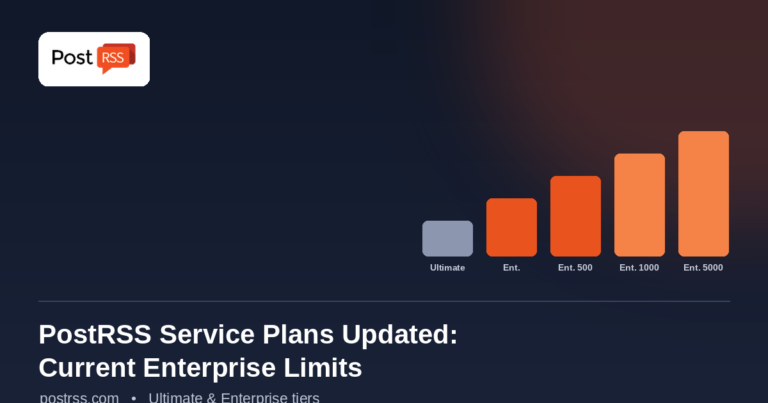
PostRSS Enterprise & Ultimate Plans (2026 Update)
Actualizat: 2026-08-30

Updated: 2026-08-20 This post originally announced a May 2015 increase to Ultimate and Enterprise plan task limits. Those nu...

Citește mai mult »
Meniu
x
PostRSS - Platformă de automatizare a fluxurilor RSS și instrument de auto-postare
Prezentare Confidențialitate

Acest site utilizează cookie-uri pentru a vă putea oferi cea mai bună experiență de utilizare posibilă. Informațiile despre cookie-uri sunt stocate în browserul dumneavoastră și îndeplinesc funcții precum recunoașterea dumneavoastră atunci când reveniți pe site-ul nostru și ajutorarea echipei noastre de a înțelege care secțiuni ale site-ului sunt cele mai interesante și utile pentru dumneavoastră.