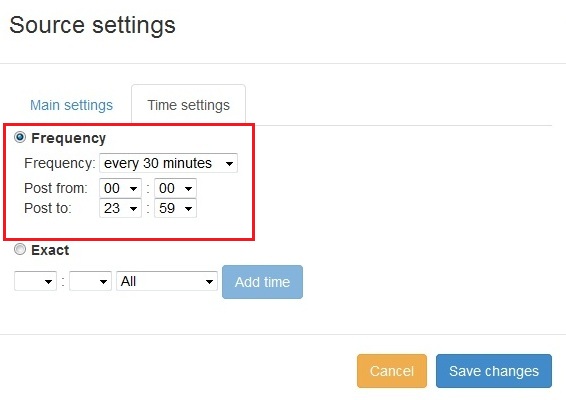
New feature added to PostRSS Advanced posting time selection. No source from Advanced time configurações Possible to add interval start e end of posting synchronize time.
Time posting preview: posting every 1 minute from 05:00 until 08:00
This feature was added to PostRSS in November 2015. It lets you decide not only what gets posted from your feed, but also when. Instead of publishing a new item as soon as it is found, PostRSS can hold posting to a time interval you choose. The example in the screenshot above shows a source set to post every minute between 05:00 and 08:00: outside that window nothing is published, and inside it new items go out at the chosen pace.
Because every target in PostRSS has its own settings, each connection can follow its own schedule. A news feed can post throughout the day, while a feed of evergreen articles can be limited to a short morning window when your audience is most active.
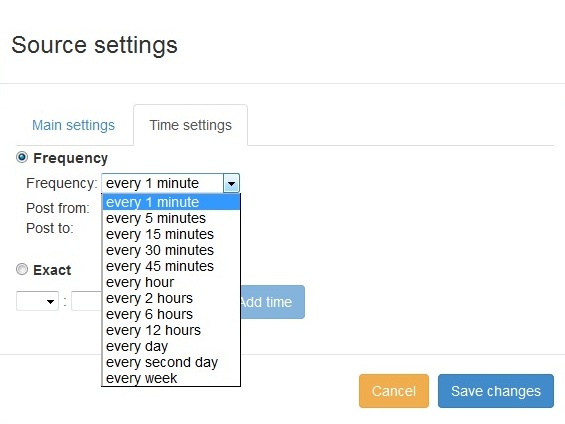
The same idea has grown since the first version. On paid plans you can now choose between two ways of controlling time:
Both options work together with the check interval. PostRSS checks each feed every 5 minutes on all plans and every minute on Enterprise plans, and you can choose a slower interval, up to once a week, if your site publishes rarely.
Time selection becomes most useful when it is combined with the order and volume controls. You can publish newer items first, older items first or in random order, and set the maximum number of posts per update. Together these settings let you spread a large batch of new items over several windows instead of posting them all in the same minute. If you want older articles shared as well, pick a date to start from and turn on catch-up: PostRSS then also posts older feed items that were never published, at the pace your time settings allow.
The full list of scheduling and filtering options is on the features page, and the plans that include posting windows are listed on the pricing page.
It limits posting to a time interval you choose, for example every minute from 05:00 until 08:00, so new feed items are published only inside that window.
Yes. On paid plans you can choose exact posting times on selected days in your own time zone, or posting windows between chosen hours.
They wait and are posted in the next window, following the order and the maximum number of posts per update you have set.
Yes. Every target has its own settings, so the same feed can post at different times to different accounts.
Every 5 minutes on all plans and every minute on Enterprise plans. You can also choose a slower interval, up to once a week.
What changed in the networks, what broke, and how to fix it before it costs you reach.
 English
 Lietuviškai
 Deutsch
 Français
 Русский
 Español
 Polski
 Italiano
 Українська
 Čeština
 Português
 日本語
日本語 Latviešu valoda
 Eesti
Eesti Magyar
 Bahasa Indonesia
 Türkçe
 हिन्दी
 Ελληνικά
 العربية
 ไทย
ไทย Tiếng Việt
 Română
 Bahasa Melayu
 বাংলা
বাংলা