RSS verso 66 social network: Facebook, Instagram, X, LinkedIn, Telegram e altri Blog Affiliazione Contatti
Every automated tool that watches your RSS feed — a social media auto-poster, a feed reader, an aggregator, a monitoring script — has to answer the same question on a recurring schedule: has anything changed since the last time I checked? The naive approach is to download the entire feed every single time and compare it to what was seen before, which works but wastes bandwidth on both ends and puts unnecessary load on your server, especially if several tools are polling the same feed independently. The better approach, and the one most well-built tools use, is HTTP conditional GET, a mechanism baked into the HTTP specification itself that lets a client ask “has this resource changed?” and get a fast, nearly free “no” answer the vast majority of the time. This is one of the more overlooked corners of technical SEO for RSS feeds, and understanding how it works helps explain both why some feeds get checked more often than others and why some auto-posting setups seem to lag behind a site’s actual publishing schedule.
A standard HTTP GET request is unconditional: the client asks for a resource, and the server sends back the full response body every time, regardless of whether anything has changed since the last request. A conditional GET request adds extra information to the request — specifically a validator, some token that represents the state of the resource the client already has cached — and asks the server to only send the full body back if that validator no longer matches the current state of the resource. If the validator still matches, meaning nothing has changed, the server can skip sending the body entirely and instead respond with a lightweight status code confirming that the client’s cached copy is still good. This is not an RSS-specific feature; it is a general HTTP caching mechanism defined in RFC 7232 that applies to any resource served over HTTP, feeds included. Two separate implementations of this mechanism exist and are commonly used together or independently: one based on an opaque token called an ETag, and an older one based on a timestamp called Last-Modified. Both accomplish the same basic goal through slightly different means, and a well-configured server will typically support both.
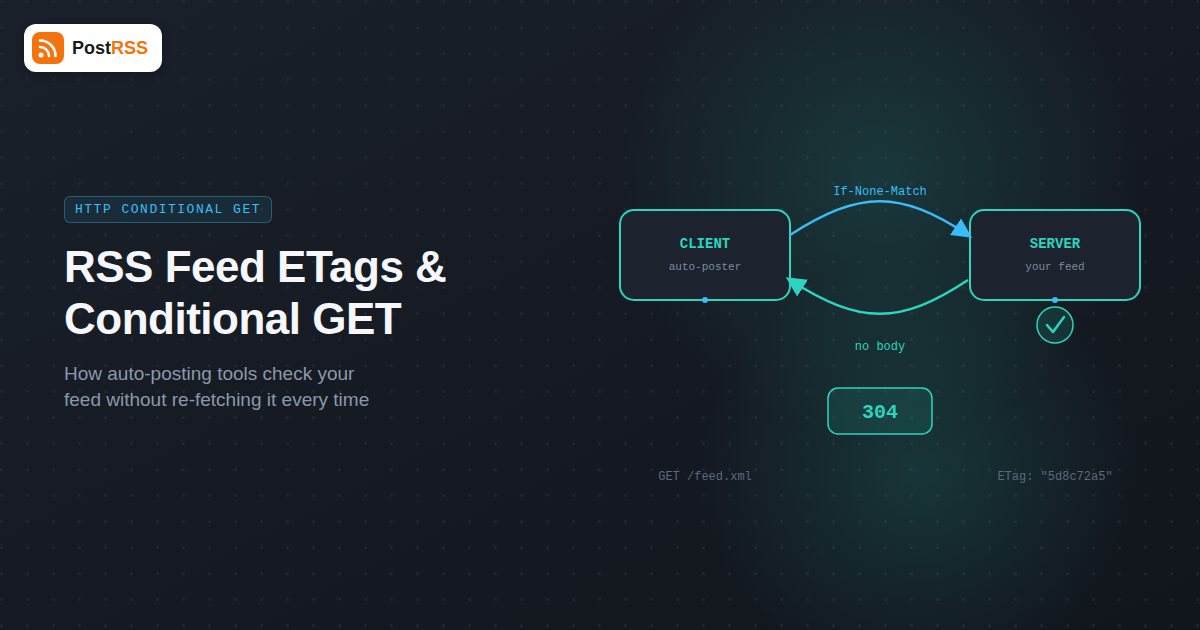
An ETag, short for entity tag, is a string the server generates that represents a specific version of a resource — often a hash of the content, though the exact generation method is entirely up to the server and is never something a client needs to understand or parse, only compare. When a server sends a feed in response to a request, it can include an ETag response header containing this token, something like ETag: "5d8c72a5edda". The client, an RSS polling tool in this case, stores that value alongside the feed URL. On the next scheduled check, instead of just requesting the feed plain, the client sends an If-None-Match request header containing the stored ETag value, effectively asking the server “does the current version of this resource still match this token?” If the feed content has not changed since that ETag was generated, the server responds with an HTTP 304 Not Modified status and no body at all — just a small set of headers confirming the cached version is still current. If the content has changed, the server generates a new ETag, sends the full feed body along with a 200 OK status, and the new ETag value in the response headers, which the client then stores for the next round. Because ETags are typically derived from content hashes, they are precise: even a single-character change to the feed will produce a different ETag and correctly trigger a full response, which makes ETag-based validation generally more reliable than timestamp-based validation for detecting real changes.
Before ETags were widely adopted, HTTP caching relied primarily on the Last-Modified header, and it is still in use today, often alongside ETags as a fallback or a secondary signal. When a server responds to a request, it can include a Last-Modified header stating the timestamp at which the resource was last changed, such as Last-Modified: Tue, 09 Sep 2026 14:22:00 GMT. The client stores this timestamp, and on the next request sends it back in an If-Modified-Since header, asking the server whether the resource has been modified since that exact moment. If it has not, the server again responds with 304 Not Modified and no body; if it has, the server sends the updated content along with a new Last-Modified timestamp. The main practical difference from ETag validation is granularity: Last-Modified timestamps are typically only precise to the second, which means two genuinely different versions of a feed published within the same second could theoretically be treated as identical, though this is a rare edge case for most publishing workflows. A more common real-world problem, covered further down, is servers or CMS platforms that regenerate a fresh Last-Modified timestamp on every request regardless of whether the underlying content actually changed, which defeats the entire mechanism even though the header is technically present.
The practical value of conditional GET shows up on both sides of the connection. On the publisher’s side, a feed that is polled by a dozen different tools — an auto-poster, a couple of RSS readers subscribed by individual readers, a monitoring service, an aggregator — multiplies whatever the cost of serving that feed is by however many times it gets checked. If every one of those checks pulls the full feed body, and the feed includes the last 20 or 50 items with full content, that can add up to meaningful bandwidth and server processing over a month, particularly for a self-hosted CMS running on modest hosting rather than a CDN-fronted setup. A 304 response, by contrast, typically involves only a database lookup or file-stat call to check a hash or modification time, with no template rendering and a response body of essentially zero bytes. This is a large enough difference that some hosting providers and CDNs treat repeated full-body feed requests as a load pattern worth flagging.
On the automation side, conditional GET is what makes frequent polling economically reasonable in the first place. A tool that has to pay the full cost of downloading and parsing an entire feed on every check has a real incentive to poll infrequently — every hour, or even less often — simply to keep its own bandwidth and compute costs down across the potentially large number of feeds it monitors on behalf of many users. A tool that can send a conditional request and usually get back a 304 with no body can afford to check much more often, sometimes every few minutes, because the cost of a “nothing changed” check is negligible. This is a big part of why the responsiveness of an Feed RSS monitoring or auto-posting setup — how quickly a new post actually shows up as a social media post after publishing — depends not just on the polling interval a tool advertises, but on whether conditional GET is working correctly for that specific feed. A feed that supports conditional GET well can be checked aggressively without cost concerns; a feed that doesn’t forces even well-intentioned tools into more conservative polling schedules to avoid hammering the server with full downloads.
Not every server sends ETag or Last-Modified headers, and not every feed-serving setup respects the conditional request headers even when it does send them. In that situation, a well-built polling tool doesn’t just give up — it falls back to a full re-fetch on every check, downloads the complete feed body every time regardless of whether anything changed, and then does the change detection itself at the application level rather than relying on the HTTP layer to do it. The standard way to do this is by comparing item GUIDs — the unique identifier each RSS or Atom item is supposed to carry — against the set of GUIDs already seen from previous fetches. Any GUID present in the new fetch that wasn’t in the previously seen set is treated as a new item and processed accordingly; anything already seen is ignored even though it was re-downloaded. This works reliably as long as the feed’s GUIDs are actually stable and unique, which is usually the case but not always guaranteed, particularly with some feed generators that derive the GUID from something that can change, like a post’s URL slug or its content hash, rather than a fixed database ID. The tradeoff is real: GUID-based fallback detection is accurate for identifying new items, but it does nothing to reduce the bandwidth or server load cost of the full re-fetch itself, which is exactly the cost conditional GET exists to eliminate. A tool relying on this fallback for a large number of feeds will simply pay the full transfer cost on every poll, which in practice tends to push polling intervals for those feeds to be longer than they would be otherwise.
Checking whether your feed supports conditional GET properly doesn’t require anything beyond a terminal and curl, and it’s worth doing directly rather than assuming your CMS handles it correctly by default. First, request the feed with a HEAD request to see the headers without pulling the body:
curl -I https://example.com/feed/Look for an ETag header and a Last-Modified header in the response. If neither is present, conditional GET isn’t available on that feed at all, and every tool polling it is forced into full re-fetches. If you see an ETag, copy its exact value — including the quotation marks, which are part of the value — and issue a second request that sends it back as a conditional check:
curl -I -H 'If-None-Match: "5d8c72a5edda"' https://example.com/feed/If conditional GET is working correctly, this should return HTTP/1.1 304 Not Modified with no body, assuming the feed hasn’t changed between your two requests. If it instead returns a normal 200 OK with the full feed body again, something is stripping or ignoring the conditional request headers somewhere between curl and the origin server. The same test works with Last-Modified: take the timestamp from the first response’s Last-Modified header and send it back as If-Modified-Since in a follow-up request, and check for the same 304 behavior. Running both checks tells you not just whether the headers are present, but whether the conditional logic behind them actually works, which is the part that’s easy to get wrong even when the headers themselves look correct.
A feed can appear to support conditional GET — headers present, values that look reasonable — and still fail to actually deliver 304 responses in practice, usually because of one of a small number of recurring misconfigurations.
/feed/ endpoint specifically. It’s common for a site’s homepage to have solid caching headers while its feed URL has none at all, simply because nobody configured the caching layer to treat the feed as a cacheable resource in the first place.| Factor | Conditional GET (ETag / Last-Modified) | Full Re-Fetch Every Time |
|---|---|---|
| Server load per unchanged check | Minimal — a hash or timestamp comparison, no template rendering | Full — complete feed generation and transfer on every poll |
| Bandwidth per unchanged check | Near zero — 304 response with no body | Full feed size, every time, regardless of change |
| Change detection speed at a given poll frequency | Fast, since low cost per check allows more frequent polling | Slower in practice, since cost per check discourages frequent polling |
| Accuracy of detecting genuinely new items | High, when ETags/timestamps are generated correctly | High, when paired with GUID comparison at the application layer |
| Implementation complexity for the server | Requires generating and comparing a stable validator | None — default behavior of any server with no extra work |
| Implementation complexity for the client | Requires storing and resending validator headers per feed | Requires storing and comparing item GUIDs to detect new items |
| Failure mode | Silent degradation to full re-fetch if misconfigured | None to degrade to — already the baseline behavior |
No, but it helps significantly if the feed is checked frequently by multiple tools. A low-traffic feed checked once an hour by a single reader will function fine either way, while a feed monitored by several automation tools benefits noticeably from proper conditional GET support, both in reduced server load and in how quickly new items get detected and acted on.
A 200 OK response means the server sent the full feed content because either the client didn’t send a conditional request or the resource has changed since the client’s cached version. A 304 Not Modified means the server confirmed the client’s cached copy is still current and deliberately sent no body, saving both parties the cost of transferring content that hasn’t changed.
Yes, in most cases, though it usually requires configuration at the web server or caching layer rather than the application itself — for example, configuring Nginx, Apache, or a caching plugin to generate ETag headers for the feed endpoint specifically, since many caching setups only apply to standard HTML pages by default and skip feed URLs entirely.
This usually points to one of the misconfigurations above: the ETag value might be changing on every request even without real content changes, a CDN in front of the origin might be stripping the conditional request headers before they reach the origin server, or the polling tool itself might not be implementing conditional GET correctly on its end, which is worth checking against the tool’s documentation.
No — conditional GET reduces the cost of each check, which typically allows more frequent polling, but items are still only detected on the tool’s next scheduled check, whatever that interval happens to be. It improves how affordable frequent checking is; it doesn’t make polling instantaneous or event-driven on its own.
If-None-Match with an ETag is generally considered more reliable because it’s typically based on a content hash and detects any change precisely, while If-Modified-Since relies on a timestamp that’s only accurate to the second and depends on the server correctly tracking real content-modification times rather than request times. When both are available, most well-built clients prefer the ETag.
It can, particularly if your feed is polled frequently by multiple external tools and your feed generation is at all expensive — for example, if it queries a database and renders full post content on every request rather than being served from a cached file. Proper 304 support turns most of those repeat checks into cheap header-only responses instead of full page generations.
Conditional GET is a small, decades-old piece of the HTTP specification, but it has an outsized effect on how automation tools interact with your feed: it’s the difference between a check that costs almost nothing and one that transfers the full feed body every time, and it’s a meaningful factor in how frequently a tool can afford to poll your site without generating unnecessary load. Verifying that your feed sends correct, stable ETag and Last-Modified headers — and that nothing in your caching layer is stripping or ignoring them — is a worthwhile piece of maintenance for any site relying on automated distribution of new posts. Once that part of the pipeline is solid, connecting your feed to automated social posting through PostRSS means new content gets picked up efficiently and pushed out across your social channels without you or your server paying an unnecessary cost for every check along the way.
What changed in the networks, what broke, and how to fix it before it costs you reach.
Realizzati da Internet Solutions, il team dietro PostRSS. Ognuno ti fa risparmiare tempo in modo diverso.
 English
 Lietuviškai
 Deutsch
 Français
 Русский
 Español
 Polski
 Italiano
 Українська
 Čeština
 Português
 日本語
日本語 Latviešu valoda
 Eesti
Eesti Magyar
 Bahasa Indonesia
 Türkçe
 हिन्दी
 Ελληνικά
 العربية
 ไทย
ไทย Tiếng Việt
 Română
 Bahasa Melayu
 বাংলা
বাংলা