WordPress Auto Post to X

This tag covers automatically posting new WordPress articles to X (formerly Twitter) using the site's RSS feed through PostRSS. Because X's audience expects frequent, timely updates, PostRSS's fast refresh interval matters more here than on slower-moving networks like LinkedIn or Pinterest. WordPress generates a default RSS feed automatically at /feed/ for every site, and PostRSS connects to that native feed directly, so no additional on-server plugin is needed and the site's own performance is unaffected. Because PostRSS runs its feed checks in the cloud rather than on the WordPress server itself, it avoids the resource drain that some self-hosted auto-posting plugins introduce during high-traffic periods. Because WordPress generates a feed automatically at /feed/, no extra plugin installation is needed on the WordPress site itself — PostRSS reads that feed directly. This combination requires PostRSS's Ultimate plan for X access.
Post Automatically RSS Feeds to Social Networks with the PostRSS Tool
Diperbarui: 2026-08-20

Updated: 2026-08-20 Manually sharing every new website update across multiple social profiles is an ineffective use of ...

Baca selengkapnya »
Auto Post WordPress and Blog RSS Feed to Facebook, X, LinkedIn, and VKontakte
Diperbarui: 2026-08-30

Updated: 2026-08-20 If you run a WordPress website or a professional blog, consistently promoting your new content on s...

Baca selengkapnya »
Post Your RSS Feeds Easier and Faster Than Ever
Diperbarui: 2026-08-30

Updated: 2026-08-20 Managing multiple social media accounts while regularly publishing fresh content on your website ca...

Baca selengkapnya »
How to Connect Official PostRSS Apps to Securely Auto-Post to Major Social Networks
Diperbarui: 2026-08-30

In the world of social media automation, security and ease of use are paramount. To broadcast your website’s RSS or Atom ...

Baca selengkapnya »
Which PostRSS Plan Supports Which Platform? A Clear 2026 Breakdown
Diperbarui: 2026-08-30

Updated: 2026-08-20 This post originally announced, back in December 2016, that PostRSS's Start and Professional pl...

Baca selengkapnya »
Plan Your Free Time: Social Media Automation for Owners
Diperbarui: 2026-08-30

Updated: 2026-08-20 As an entrepreneur, blogger, or digital marketer, your most valuable asset isn't capital — it's time. Be...

Baca selengkapnya »
Why SSL & HTTPS Matter for Secure Social Automation
Diperbarui: 2026-08-30

Updated: 2026-08-20 In the modern digital landscape, web security is no longer an optional luxury — it is an absolute necess...

Baca selengkapnya »
How to Increase Your Sales Automatically Using E-Commerce RSS Syndication
Diperbarui: 2026-08-30

Updated: 2026-08-20 For e-commerce store owners, digital marketers, and product creators, driving consistent revenue is...

Baca selengkapnya »
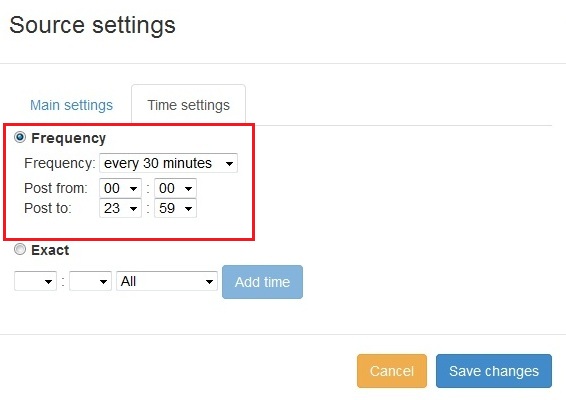
Fitur baru ditambahkan ke PostRSS: Pemilihan waktu posting tingkat lanjut
Diperbarui: 2015-11-11

  New feature added to PostRSS Advanced posting time selection. No source from Advanced time settings Possible to add i...

Baca selengkapnya »
Bagaimana cara menyinkronkan akun sosial Anda dengan aplikasi PostRSS?
Diperbarui: 2015-11-03

We receiving many questions: How to synchronize social my accounts? I am don't see my Facebook page in listings? How po...

Baca selengkapnya »
Cara Memposting Tautan di Twitter dengan Gambar
Diperbarui: 2026-08-30

Twitter Card META Tags There are four current types of Twitter/X Cards: summary, summary_large_image, player, and app. The sum...

Baca selengkapnya »
PostRSS Plans for Every Size: From Solo Start to Enterprise 5000
Diperbarui: 2026-08-30

Updated: 2026-08-20 This post originally announced two additions to PostRSS's pricing lineup back in June 2015: a S...

Baca selengkapnya »
Memuat lebih banyak artikel…
Menu
x
PostRSS - Platform Otomatisasi RSS Feed & Alat Auto-Posting
Ikhtisar Privasi

Situs web ini menggunakan cookie agar kami dapat memberikan pengalaman pengguna terbaik bagi Anda. Informasi cookie disimpan di browser Anda dan menjalankan fungsi seperti mengenali Anda saat Anda kembali ke situs web kami serta membantu tim kami memahami bagian situs web mana yang menurut Anda paling menarik dan bermanfaat.