Every major social platform now ships its own scheduler. Meta Business Suite lets you queue Facebook and Instagram posts. X has a native composer with a built-in schedule button. LinkedIn added “Schedule for later” to both personal posts and Company Pages. Pinterest lets you pick a future publish date right in the Pin creation flow. On paper, that looks like all the scheduling most people need, for free, without connecting a third-party app to your accounts.
So why does a whole category of RSS-based auto-posting tools still exist, and why do publishers, agencies, and content-heavy businesses keep paying for them instead of just using what’s already built into each platform? The answer comes down to one word: source. Native schedulers schedule posts you write. RSS automation tools like PostRSS publish posts that already exist, because your site already published them. That distinction sounds small until you’re the one manually copying a headline and link into five different composer boxes for the third time this week.
This article breaks down exactly what native schedulers do well, where they run out of road, and how to decide which approach — or which combination — actually fits how you publish content in 2026.
It’s worth being fair to the built-in tools before picking them apart, because for a specific kind of user they are genuinely the right choice. Three advantages stand out.
Meta Business Suite, X’s native scheduler, LinkedIn’s “Schedule for later,” and Pinterest’s Pin scheduler all ship at no additional cost as part of using the platform. There’s no subscription, no tiered plan, no per-account pricing. If your posting volume is low and you only need one platform, the price is impossible to beat.
Every time you connect an external tool to a social account, you’re granting an app permission to post on your behalf via that platform’s API. Native schedulers avoid this entirely — you’re staying inside Meta’s own product to schedule a Meta post, inside X’s own product to schedule an X post. For security-conscious teams, or accounts where OAuth access is restricted by policy, that’s a legitimate reason to stick with native tools.
Because the scheduler is built by the platform itself, it tends to support every native post type immediately — Stories, Reels, carousel posts, poll posts, whatever the platform ships next. Third-party tools, including RSS-based ones, are constrained by what each platform’s public API actually exposes, which usually lags behind what the native app can do. If you need to schedule a niche native format, the native tool is often your only option.
These are real strengths, not consolation prizes. The problem is that all three of them describe a tool built for scheduling posts you compose one at a time — not for distributing content a website is already generating on its own schedule.
The moment your goal shifts from “schedule this one post” to “get every new blog article, product update, or podcast episode distributed to social automatically,” native schedulers reveal five structural gaps.
This is the core issue. None of Meta Business Suite, X’s scheduler, LinkedIn’s scheduling, or Pinterest’s Pin scheduler can read an RSS or Atom feed and turn new items into posts automatically. There is no “watch this URL and post when it updates” setting anywhere in these tools. Every single post has to be created by a human: open the composer, write or paste the caption, attach the image, pick the date and time, hit schedule. If your site publishes five articles a week, that’s five separate manual entries per platform, every week, indefinitely.
Native schedulers are platform-specific by design — that’s what “native” means. Meta Business Suite doesn’t send anything to LinkedIn. LinkedIn’s scheduler has no concept of X. Pinterest’s Pin scheduler only knows about Pinterest. If you distribute to four platforms, you’re logging into four separate tools, each with its own interface, its own image sizing rules, and its own posting queue, and repeating the same manual work in each one. There’s no “publish once, distribute everywhere” workflow available anywhere in the native toolset — you have to build that yourself, by hand, every time.
Even accounts that use two or three native schedulers in parallel usually end up posting everywhere at once, because coordinating a staggered release — Facebook now, X in twenty minutes, LinkedIn an hour later — means manually setting different times in different tools and keeping track of which platform got which slot. There’s no shared timing logic across them, no way to say “when this article goes live, space these five posts out automatically.” Anyone who wants deliberate pacing across platforms is doing the math and the data entry themselves.
If you’re not using a feed-based tool, this gap doesn’t apply to you — but it’s exactly the gap that matters once you are trying to automate from a feed. A feed can go stale, throw malformed XML, drop items, or silently stop updating after a CMS migration or plugin update, and none of the native platform schedulers have any concept of a “feed” in the first place, so there’s nothing to monitor and nothing that would tell you if your distribution silently stopped working. A dedicated automation tool built around feeds treats this as core functionality; a native scheduler simply has no equivalent feature to fall short on.
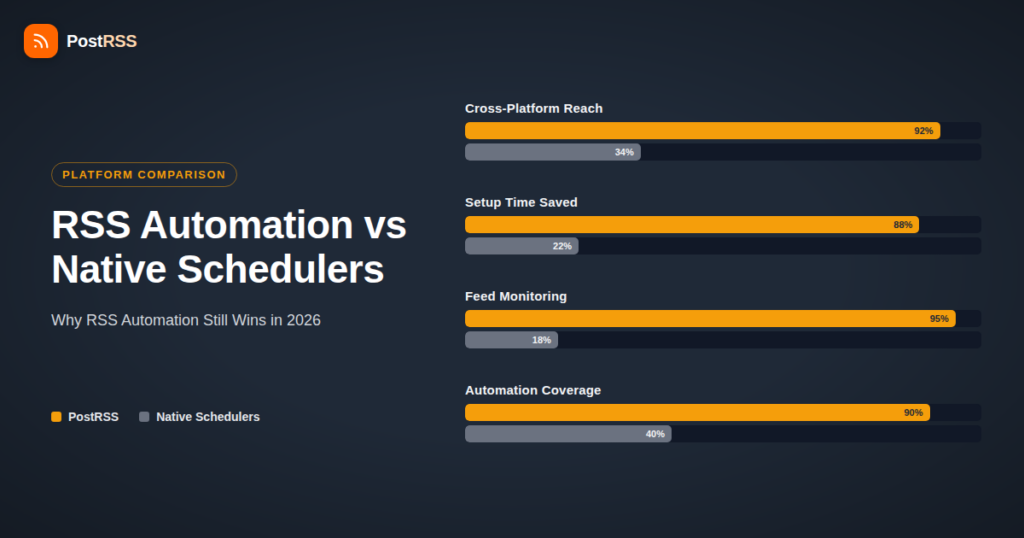
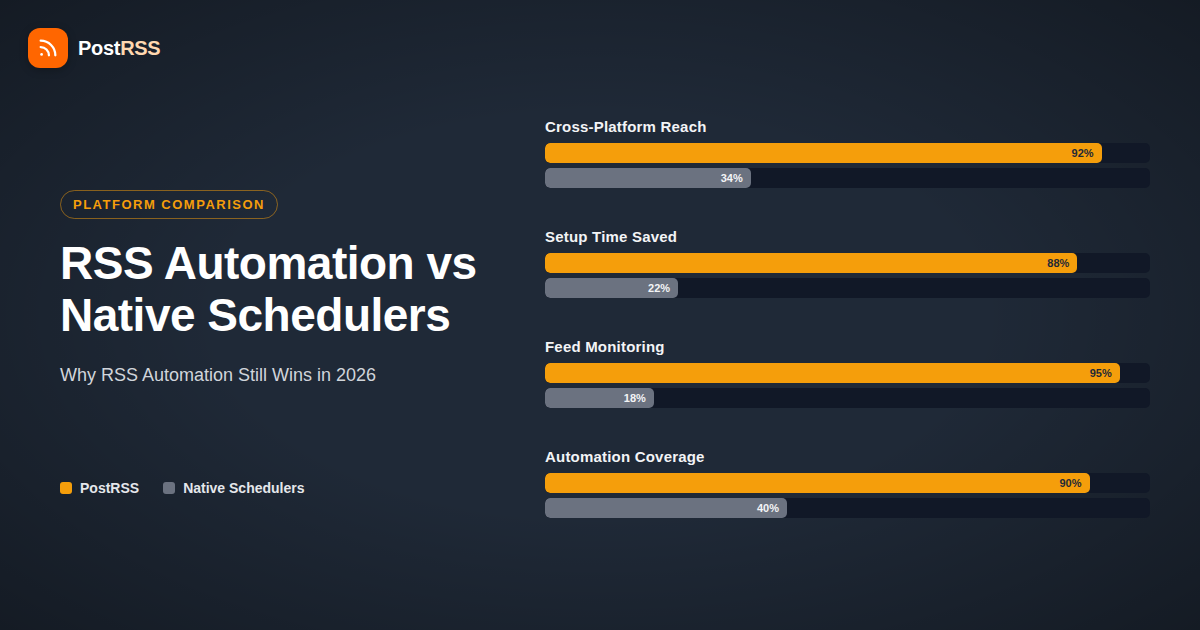
Individually, entering one post into one scheduler takes a couple of minutes. The problem is multiplication. Four platforms, five posts a week, two minutes of manual entry each, comes out to roughly 40 minutes a week — over 34 hours a year — spent purely on copy-pasting titles and links into different browser tabs. That’s before accounting for the mental overhead of context-switching between four different interfaces, or the posts that get missed because someone forgot to log into one of the schedulers that week. None of that time produces new content or new strategy; it’s pure administrative overhead sitting between “we published this” and “our audience saw it.”
The table below lines up the two approaches directly, using the criteria that actually matter when you’re deciding which one fits your workflow.
| Criteria | Native Schedulers (Meta Business Suite, X, LinkedIn, Pinterest) | PostRSS |
|---|---|---|
| Source of content | Manually typed or pasted into each composer, one post at a time | Pulled automatically from your RSS/Atom feed as new items are published |
| Cross-platform reach | None — each platform’s scheduler only posts to that platform | One feed distributes to Facebook, X, LinkedIn, Pinterest, VKontakte, Instagram, Threads, Mastodon, Bluesky, and more from a single setup |
| Manual effort per post | High — repeat data entry in every platform’s separate tool, every time | Near zero after setup — new feed items publish automatically, no re-entry |
| Staggered/multi-platform timing | Not available — you’d have to manually stagger times across separate tools | Built in, with fine-grained timing controls available through the Advanced Calendar for spacing posts and controlling exact publish windows |
| Feed monitoring/troubleshooting | Not applicable — no feed concept exists in these tools | Feed health checks and troubleshooting built in, so a broken or stale feed doesn’t silently stop your distribution |
| Third-party auth exposure | None — you stay inside each platform’s own product | Standard OAuth connections to each Target platform, scoped to posting only |
| Best fit | Occasional, one-off, hand-crafted posts on a single platform | Frequent publishers distributing the same content across multiple platforms automatically |
| Cost | Free, included with each platform | Free tier available; paid plans scale with posting volume and features, not per-account fees |
| Networks reachable from one feed | Varies by plan — check their current list | 66 networks incl. Fediverse, Asian and team-chat platforms |
It’s tempting for any tool’s marketing to argue that automation is always the better answer. It isn’t. There are real situations where native scheduling is the right call and adding a third-party tool would just be extra overhead.
In each of these cases, the native tool is doing exactly what it was built for: scheduling a post you’re writing right now, for a platform you’re posting to directly. That’s a genuinely good product for that job.
The calculus flips as soon as content already exists somewhere else before it reaches social — a blog, a newsroom, a podcast RSS feed, a product changelog, a job board, an e-commerce catalog. In that situation, native schedulers force you to re-type content that a machine could already read directly from the source. This is where a category built around social media automation earns its cost.
Any site publishing more than a couple of items a week hits the multiplication problem fast. A blog posting daily, times four target platforms, is 28 manual scheduler entries a week if done natively. The same feed connected once to an automation tool turns that into zero ongoing manual work — new posts go out as the feed updates.
Businesses that want presence on more than one or two networks are the clearest case. Rather than maintaining four separate native scheduling habits (and four separate places to forget to post), one feed connection handles the full spread, with platform-specific formatting handled automatically per Target.
Agencies face the native-scheduler problem multiplied by every client. Logging into a different Meta Business Suite, LinkedIn Page, and X account for each client, for every piece of content, doesn’t scale past a handful of accounts before it becomes someone’s full-time job. Feed-based tools built around auto-posting let an agency connect each client’s content source once and let distribution run in the background, freeing up account manager time for actual strategy work instead of copy-paste.
If your CMS, e-commerce platform, podcast host, or job board already generates an RSS or Atom feed — and most modern platforms do, often without you realizing it — that feed is a ready-made automation source. Connecting it once via RSS automation means every future publish is distributed without a second thought, and the workflow keeps working even as your publishing cadence changes, without you having to reconfigure anything.
Beyond the raw time savings, there are a few operational differences worth naming explicitly, because they don’t show up until you’re actually running the workflow day to day.
Manual scheduling across native tools depends on someone remembering to do it — every time, for every platform, for every new piece of content. Miss a week because of vacation, a busy sprint, or just forgetting, and that content never reaches half your audience. Feed-based automation removes the dependency on anyone remembering anything after the initial setup. New content publishes to social because the underlying source published it, not because someone opened four browser tabs that morning.
X has a character limit that Facebook doesn’t. LinkedIn treats hashtags differently than Pinterest, which cares primarily about the image and a description built around search intent. Doing this correctly by hand means remembering a different set of rules every time you paste content into a different composer. A tool built specifically for cross-platform feed distribution applies the right formatting per destination automatically, so the same source item arrives correctly shaped on each platform without manual reformatting.
With native tools, there’s no signal at all if something in your process quietly breaks, because there’s no process to monitor — you either did the manual work or you didn’t. With a feed-based tool, feed health is itself something the system can watch: if a feed stops updating, returns malformed data, or an item fails to post, that’s a detectable, fixable event rather than a silent gap in your posting history that you only discover weeks later when you notice engagement has dropped.
If you’re still weighing the two approaches for your own situation, a few direct questions tend to settle it quickly:
Most small creators and one-off announcements land on “native scheduler is enough.” Most businesses, blogs, and agencies publishing regularly across more than one platform land on “automation pays for itself within the first month,” often faster once the time saved on manual entry gets added up.
Yes, and many accounts do. A common pattern is letting feed-based automation handle the recurring, predictable content — new blog posts, product updates, podcast episodes — while using a platform’s native scheduler for one-off announcements, campaigns, or post types that automation doesn’t cover, like interactive Story formats.
Feed-based tools like PostRSS typically post a short excerpt or headline with a link back to the original article, rather than reproducing the full text on the social platform. That keeps the canonical source — your site — as the place readers actually land, which also matters for SEO, since it avoids duplicating substantial blocks of content elsewhere.
Any third-party posting tool requires standard OAuth authorization scoped to posting on your behalf, the same mechanism every reputable scheduling tool uses. The risk is generally low with established providers, but it’s a legitimate reason some security-conscious organizations prefer native tools when volume is low enough that the trade-off makes sense.
This is exactly the gap native schedulers can’t address at all, since they have no concept of a feed to monitor. A dedicated automation tool can flag feed errors, stale feeds, or failed posts so you find out quickly rather than discovering weeks later that nothing has been distributed.
No. Most modern CMS platforms, blog engines, podcast hosts, and e-commerce tools generate an RSS or Atom feed automatically, usually at a predictable URL, without any manual configuration required from the site owner. Setting up automation is typically a matter of pasting that feed URL in and connecting your target social accounts — the underlying feed mechanics stay invisible.
The core scheduling features in Meta Business Suite, X, LinkedIn, and Pinterest are free to use. The limitation isn’t cost, it’s capability — none of them read a feed or distribute across platforms, regardless of how much you’re willing to pay for a premium tier, because that functionality simply isn’t part of what these tools were built to do.
There’s no universal number, but a useful rule of thumb: once you’re posting the same or similar content to more than two platforms, more than once a week, the manual time cost of native scheduling typically exceeds the setup time of connecting a feed to an automation tool within the first month.
Native platform schedulers aren’t bad tools — they’re the right tool for a specific job: scheduling a post you’re writing right now, for one platform, occasionally. Where they consistently fall short is content distribution at any real scale: they can’t read a feed, can’t coordinate posting across platforms, can’t stagger timing from a single source, and can’t tell you when something’s silently broken. Every one of those gaps has to be filled by a person, manually, forever, if you stick with native tools alone.
RSS-based automation exists specifically to close that gap. If your content already originates somewhere — a blog, a feed, a catalog — and you want it distributed across more than one platform without re-typing it every time, that’s the exact use case PostRSS is built around: connect a feed once, and let publishing to Facebook, X, LinkedIn, Pinterest, VKontakte, Instagram, Threads, Mastodon, and Bluesky happen automatically from there. For occasional single-platform posts, native scheduling remains genuinely enough. For anyone publishing regularly across multiple platforms, the math — and the time saved — points the other way.
What changed in the networks, what broke, and how to fix it before it costs you reach.
Dibuat oleh Internet Solutions, tim di balik PostRSS. Masing-masing menghemat waktu Anda dengan caranya sendiri.
 English
 Lietuviškai
 Deutsch
 Français
 Русский
 Español
 Polski
 Italiano
 Українська
 Čeština
 Português
 日本語
日本語 Latviešu valoda
 Eesti
Eesti Magyar
 Bahasa Indonesia
 Türkçe
 हिन्दी
 Ελληνικά
 العربية
 ไทย
ไทย Tiếng Việt
 Română
 Bahasa Melayu
 বাংলা
বাংলা