66টি সোশ্যাল নেটওয়ার্কে RSS: Facebook, Instagram, X, LinkedIn, Telegram এবং আরও অনেক কিছু ব্লগ অ্যাফিলিয়েট যোগাযোগ
Short answer: the PostRSS Start plan gives you one target and 500 posts a month, but the list of networks you can choose for that single target is long: Telegram and Discord, your own WordPress or Ghost site, a Discourse forum, DEV, Telegraph, Matrix, team chats and webhooks into Slack, Teams, Zapier, Make or n8n, among others. The question on this plan is not how many networks you can reach, it is which one destination gives your feed the most value. This guide compares eight good answers and shows how to use the 500 posts well.
Most plan comparisons focus on the top of the ladder, where limits are large and lists are long. The small plans are more interesting for a personal site, a hobby project or a team that wants to test automation before spending more. On the Start plan the key number is one: one target. That sounds restrictive until you notice what the plan includes. Start unlocks dozens of networks that are not available on the Free plan, including publishing platforms, forums and chat tools, and it gives you 500 posts a month for that target, which is a lot for any feed that is not a news service. This article explains how to choose the single best destination and how to get the most out of it. All plan figures come from the live pricing page and plan list and can change, so check them before you decide.
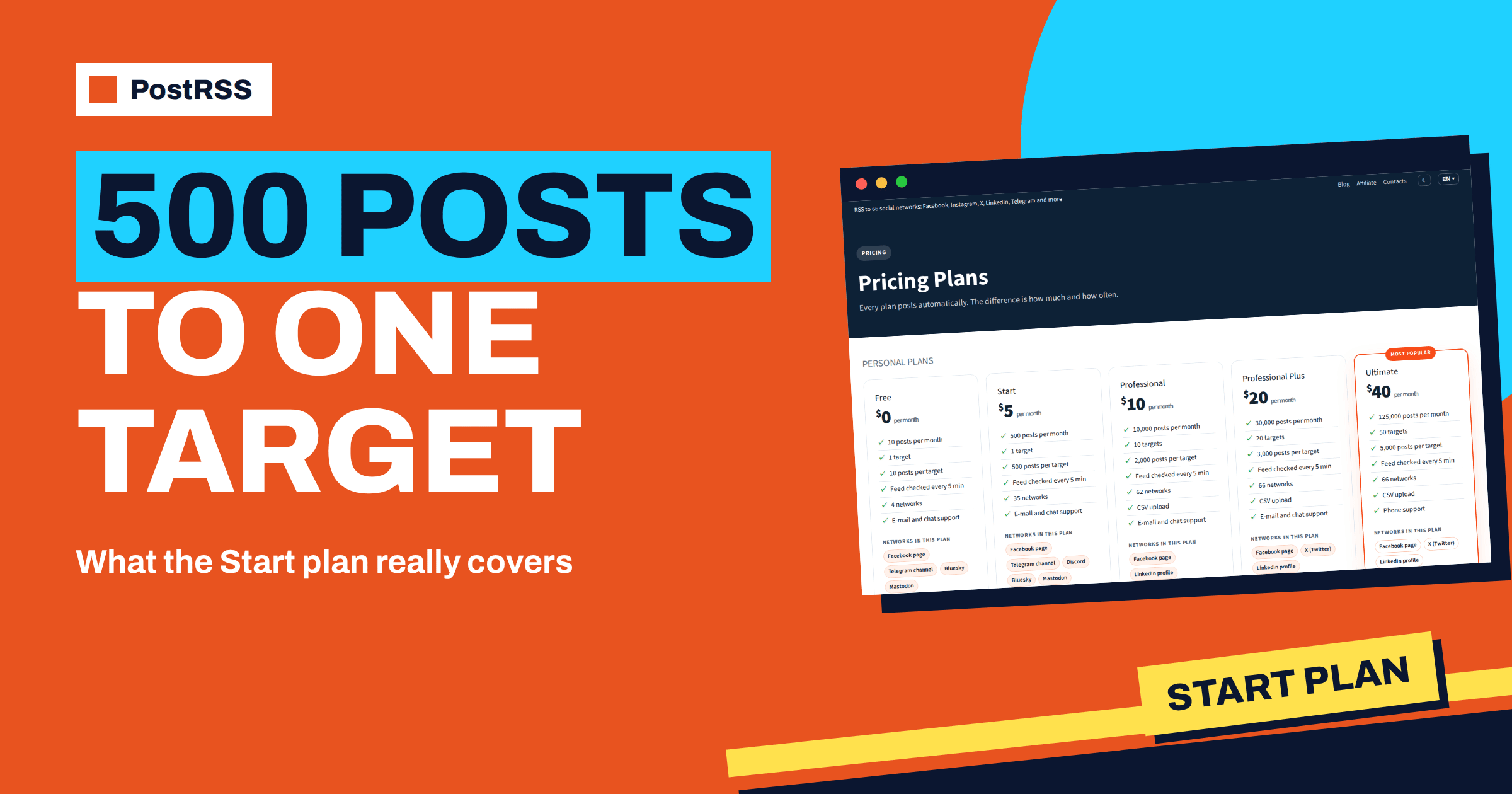
The pricing page lists the Start plan with 500 posts a month, one target and 500 posts per target. The Free plan has ten posts, one target and four networks: a Facebook Page, a Telegram channel, Bluesky and Mastodon. Start keeps the single target but widens the list of networks well beyond those four. It adds, among others, Discord, Matrix, Tumblr, Instapaper, Nostr, WordPress, Blogger, Misskey, Ghost, Pixelfed, WriteFreely, Readwise Reader, several team chat tools, Discourse, DEV, Telegraph, Micro.blog, Dreamwidth, Are.na, Lemmy and webhooks.
The plan does not include some features that appear higher up. CSV upload starts at the Professional plan, and the larger social networks such as LinkedIn, Pinterest and X come with the higher plans. If your goal is a presence on those networks, Start is not the right choice, and the guide to choosing the right PostRSS plan will help you compare. If your goal is one well-chosen destination, read on.
Ask three questions. Where do the people who should read your content already spend time? Which destination turns a post into something lasting, such as a page that search engines index or a thread that members can discuss? And which destination costs you the least attention to maintain? A destination that fits the answers will make the single target worth more than a scattered presence on several networks.
The eight options below are not rankings. Each one fits a different situation, and each uses facts from the public pages of PostRSS.
Telegram is available even on the Free plan, so on Start it is a choice rather than a necessity. It suits sites with an audience that reads on phones and likes instant updates: local news, deals, a community project. You add the PostRSS bot as an administrator of the channel with permission to post, and Telegram builds a large preview card from the Open Graph image and description of your page. The 500 posts a month are plenty for a channel that receives a few items a day.
Discord works through a webhook that you create in the server settings for one channel. There is no bot to install and no sign-in to authorise, and deleting the webhook stops the posts at once. PostRSS sends the title and link, and Discord builds its embed from the page. This is a good choice for communities that already live on Discord, such as game studios, open-source projects and clubs, because the channel can be a news feed where members react and discuss.
PostRSS can publish new feed items into a WordPress site, with the title, text and featured image. A self-hosted site connects with an application password and needs no plugin, and a site on WordPress.com connects with a sign-in. You can choose to publish, save as a draft or send for review. Ghost works in a similar way with an Admin API key, and each post carries a canonical link to the original article, which tells search engines who the source is. This option suits a publisher who wants to syndicate articles to a partner site or keep a secondary archive, while keeping the review step in the editor’s hands.
On Discourse, each new feed item opens a topic in the category that you choose, with the text, a link and the image uploaded to the forum. You connect with the address of the forum and an API key. This is a strong option for communities with a forum, because a topic invites replies, and the forum becomes the place where the content is discussed rather than merely announced. Self-hosted forums work when they are reachable over HTTPS.
For technical writers, DEV is a place where developers look for articles. PostRSS connects with your DEV API key, lets you publish immediately or save a draft, adds tags and can set the canonical URL to the original post on your own site. The draft setting is useful if you prefer to read each article before it goes out.
Telegraph turns each feed item into a clean page that loads fast and is easy to share, including in Telegram. You can paste an existing token or let PostRSS create a Telegraph account for you. It suits a site that wants a lightweight reading page for each article without maintaining another site.
If the audience is a team, a team chat is the destination. Matrix connects with a room on a homeserver and an access token that your server issues. Mattermost, Rocket.Chat, Zulip, Zoom Team Chat, Webex, Pumble, Flock, RingCentral, Zoho Cliq, Twist and Chatwork are also part of the Start list. A feed of release notes, job postings or a company blog sent to one room keeps colleagues informed without anyone forwarding links.
A webhook target sends each new item to Slack, Microsoft Teams, Zapier, Make, n8n or any service that accepts webhooks. Webhooks are included from the Start plan, according to the integrations page. This is the most flexible single target, because the receiving tool can do anything with the item: add a row to a sheet, create a task, send an email or post to a network that PostRSS does not cover. It is a good fit for teams that already use an automation platform.
| Destination | Best for | Connection |
|---|---|---|
| Telegram চ্যানেল | Fast updates for phone readers | PostRSS bot as channel administrator |
| Discord channel | Communities and studios | চ্যানেল ওয়েবহুক |
| WordPress or Ghost | Syndication and archives | Application password or Admin API key |
| Discourse | Forum discussion | Forum address and API key |
| DEV | Technical articles | API কী |
| Telegraph | Light reading pages | Token or new account |
| Matrix or team chat | Internal updates | Token, bot or webhook of the tool |
| Webhook | Custom workflows | HTTPS address of the receiving tool |
A month has about thirty days, so 500 posts is roughly sixteen posts a day. Few feeds come close. If yours does, use the controls that PostRSS gives you: a keyword filter keeps off-topic items out, and filtered items do not count against the allowance; a limit on posts per update prevents bursts; and exact times spread posts over the day. The guide to include and exclude keyword filters explains the filters. Remember that the allowance belongs to the one target, so there is nothing to split.
If you notice that you use less than a quarter of the posts, the Start plan is a comfortable fit. If you hit the limit before the end of the month, look at your sources before you upgrade, because a feed that posts every comment or every revision of an item may be producing noise.
Whatever destination you pick, the setup follows the same path. First, copy the address of your RSS or Atom feed from your website. Second, create the PostRSS account and add the feed as a source. Third, connect the destination with the method it needs: a bot, a webhook address, an application password or an API key. Fourth, choose how the post is built, for example the item title followed by the link, and decide how often the feed is checked. Fifth, wait for the next check and read the report, which shows the items that were seen and the ones that were posted.
If the first post looks wrong, change the message format or the destination settings and run the next check. A single target makes this easy, because there is only one place to look.
A solo developer who writes release notes on a blog connects the feed to a Discord channel on the project server. Every note appears as an embed card within minutes, and contributors react under it. The developer spends no time on social networks and still reaches the people who matter most for the project.
A local association with a WordPress site and a regional partner portal uses the WordPress destination to send each news item to the partner site as a draft. The partner editor reviews the draft and publishes it, and the original article remains the one that is linked and credited. Both examples use one target and a small share of the monthly posts.
Move up when the one-target rule is the real limit, not when the post count is. Typical signals are: you want the same content on a second network, you need CSV upload for a spreadsheet-based source, or you want LinkedIn or Pinterest. The next plan up has ten targets and a much larger monthly allowance. The pricing page shows the numbers of the plans side by side, so you can see what each step adds.
The Start plan is one target with a long list of possible destinations and enough posts for most feeds. Choose the destination where your readers already are or where your content lasts longest, connect it, add a filter if the feed is noisy and watch the reports for a month. If you outgrow the single target, the next plan opens ten. The current numbers are on the pricing page, and every option is described on the features page.
One target, with 500 posts a month and 500 posts for that target. The list of networks you can choose for it is much longer than on the Free plan.
Facebook Page, Telegram channel, Bluesky and Mastodon are available on the Free plan with a small number of posts. Upgrade to Start when you need more posts or one of the additional networks.
Yes. The integrations page says that webhooks are included from the Start plan, so you can send items to Slack, Teams, Zapier, Make, n8n or another service.
You can disconnect an account and connect another one, as long as you stay within the plan limits. Check the reports after the change to confirm that posts arrive.
No. CSV upload starts at the Professional plan. The Start plan reads RSS and Atom feeds.
What changed in the networks, what broke, and how to fix it before it costs you reach.
PostRSS-এর পেছনের টিম Internet Solutions-এর তৈরি। প্রতিটি পণ্য নিজের মতো করে আপনার সময় বাঁচায়।
 English
 Lietuviškai
 Deutsch
 Français
 Русский
 Español
 Polski
 Italiano
 Українська
 Čeština
 Português
 日本語
 Latviešu valoda
 Eesti
 Magyar
 Bahasa Indonesia
 Türkçe
 हिन्दी
 Ελληνικά
 العربية
 ไทย
 Tiếng Việt
 Română
 Bahasa Melayu
 বাংলা