من RSS إلى 66 شبكة تواصل اجتماعي: Facebook، وInstagram، وX، وLinkedIn، وTelegram، والمزيد المدونة برنامج التسويق بالعمولة اتصل بنا
Short answer: Professional Plus is the PostRSS plan where every network becomes available. It allows 30,000 posts a month, 20 targets and 3,000 posts per target, includes CSV upload and adds the networks that Professional does not have, such as X and WeChat, plus the networks that are being tested. It is the right step up when you have outgrown ten targets, when you need X, or when you run several brands from one account. If you use fewer than ten targets and need no X, Professional is enough.
Plans are easy to compare on paper and hard to choose in practice. A table of numbers does not tell you what changes in your daily work when you move one step up. This guide explains the Professional Plus plan in plain language: what the numbers mean, which networks it unlocks, which kinds of accounts benefit and which do not, and how to check your own needs before you change anything. All figures come from the live pricing page and the plan list of PostRSS at the time of writing, and the pricing page remains the source to trust if anything changes.
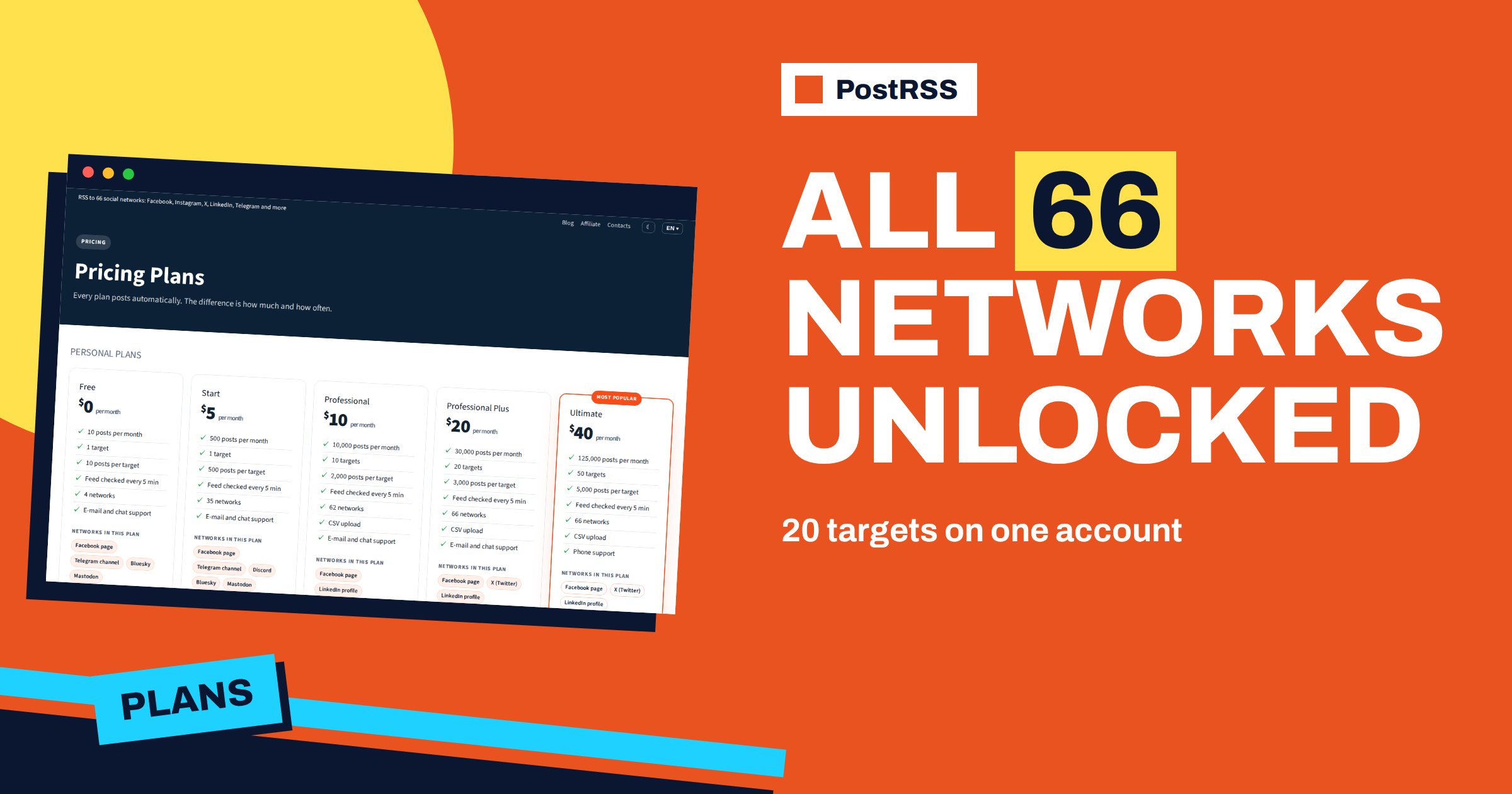
Professional Plus sits between Professional and Ultimate. Its limits are these: 30,000 posts per month, 20 targets, 3,000 posts per target, a feed check interval of five minutes and support by e-mail and chat. CSV upload is included, as it is from Professional upwards. The Professional plan below it allows 10,000 posts per month, 10 targets and 2,000 posts per target, and Ultimate above it allows 125,000 posts per month, 50 targets and 5,000 posts per target and adds phone support.
| Plan | Posts per month | الأهداف | Posts per target | الشبكات |
|---|---|---|---|---|
| الاحترافية | 10,000 | 10 | 2,000 | 62 |
| Professional Plus | 30,000 | 20 | 3,000 | All 66 |
| المثالية | 125,000 | 50 | 5,000 | All 66 |
Two definitions explain every limit. A target is one connected destination: a Facebook Page, a Telegram channel, a LinkedIn page or any other account or channel you post to. A post is each item published to one target. An article sent to three targets uses three posts from your monthly allowance. So the number of posts you need is roughly the number of items you publish multiplied by the number of targets that receive them.
The posts-per-target limit works alongside the monthly total. A single target can receive at most 3,000 posts a month on this plan, which is far more than a normal brand needs, but matters for a very busy feed such as a news site or a product catalogue that posts to one channel all day.
The pricing page states that all 66 networks are included from Professional Plus. Professional already covers most of them, including Facebook Pages, LinkedIn profiles and pages, Pinterest boards, Telegram, Discord, Bluesky, Mastodon, Threads, Tumblr and TikTok, and a long list of blog platforms, team chats and Asian networks. What it lacks is a handful of networks, and Professional Plus is where they appear:
Reddit is listed but is temporarily unavailable, and the label is shown on the plan page. Read the label before you plan around a network. The article on which plan supports which platform gives a longer breakdown, and the pricing page is always current.
Four situations make the step worth considering.
Most single businesses do not need the step. If you use six or seven targets, do not need X or WeChat and publish a few items a day, the Professional plan has plenty of room. Moving up to pay for networks that you do not use is the most common planning mistake. The article on choosing the right plan explains how to count your real needs.
Take a sheet of paper and follow four steps.
If the result is under 10,000 posts and ten targets and every network is on Professional, stay there. If one of the numbers is over, or if you need X, Professional Plus is the next stop. If you are over 30,000 posts or 20 targets, look at Ultimate.
The monthly total is not only a budget; it is also a design decision. Keyword filters decide which items a source posts, and items that a filter removes are not posted and do not count against the allowance. If your blog covers five topics, you can send each topic to the channel that suits it, instead of sending everything everywhere. A brand with twenty targets that sends every item to each of them uses twenty posts per item. A brand that routes by topic may use three. The guide to include and exclude filters describes the matching rules.
With more targets comes more risk of a flood. A single source can set the maximum number of posts per update, choose whether newer or older items go first and restrict posting to a window of hours. Paid plans also offer exact times on chosen days in your time zone. These settings protect the audience and the allowance together. If an import adds two hundred items at once, a limit per update spreads them over many checks. The article on publishing order and posts per update explains how this works.
An agency or a company with several brands is the classic Professional Plus customer. Each brand has its own feed and its own targets, and one account holds them all. Name the sources and targets clearly, for example with the brand first, so that reports are easy to read. Keep the access to each social account clear as well: who owns the Page, who may reconnect it, and what happens when a person leaves. The article about agencies managing several client websites covers the workflow. Extra users in the same account belong to the Enterprise plans.
Moving up does not change how PostRSS works. The feed is still read and each new item is posted once. The plan changes the limits and the list of networks. It does not add AI writing, it does not post to Facebook groups or personal profiles, which Meta closed in 2024, and it does not change the minimum check interval, which stays at five minutes until the Enterprise plans, where the feed is checked as often as every minute. If speed matters more than the number of targets, that is a different upgrade.
Before you change plan, finish the planning above and write down the networks you plan to connect. After the change, connect the new targets one at a time, check the first post on each and read the report. An annual subscription is twenty per cent cheaper than paying monthly, but pay yearly only when you are sure about the plan, for example after a month of real use. The article on the annual discount describes it.
A small design studio has a blog, a Facebook Page, a LinkedIn page, an X account, a Telegram channel, a Bluesky account and a Pinterest board for each of two product lines. That makes eight targets across seven networks, including X. The studio publishes about twenty items a month. Eight targets times twenty items is 160 posts, far below any limit, so the number of targets and X are what matter. Because X is needed, Professional Plus is the first plan that fits. The studio chooses it, routes product news to Pinterest and Bluesky, and sends only the main articles to X and LinkedIn with filters.
Many accounts have a quiet month and a busy one. A shop publishes twice as many items before the holidays, a club posts more during a season and an agency starts a campaign for a client. The monthly allowance is counted per month, so check your busiest month, not your average one. Look at last year’s publishing calendar, count the items of the peak and multiply by the targets that will receive them. If the peak fits with a margin, you are safe. If it does not, you can lower the load by routing with filters, by posting only the main items to the large networks, or by moving up for the season you need.
Catch-up deserves a note as well. When you connect a new target and ask PostRSS to post older items from a start date, those posts count against the allowance. Release the archive in small steps with a low limit per update, and the allowance stays predictable.
Professional Plus is a plan for people who need X, more than ten targets or room for several brands. Count your targets, check the networks and estimate your posts before you choose, and use filters and limits to make the allowance last. If you do not need these things, Professional is enough. The current numbers are on the pricing page, and the functions are on the features page.
It allows 20 targets, 30,000 posts a month and 3,000 posts per target, and it includes all 66 networks, such as X and WeChat, with the networks that are being tested.
No. The minimum interval on this plan is the same as on Professional. Checks every minute come with the Enterprise plans.
Yes. CSV upload is included from Professional upwards, so a spreadsheet can be a source on this plan.
One post for each target that receives it. An article sent to three targets uses three posts of the monthly allowance.
Yes. Twenty targets give room for several brands. Extra team users are a feature of the Enterprise plans.
What changed in the networks, what broke, and how to fix it before it costs you reach.
من تطوير Internet Solutions، الفريق الذي يقف وراء PostRSS. كل منتج يوفّر وقتك بطريقته الخاصة.
 English
 Lietuviškai
 Deutsch
 Français
 Русский
 Español
 Polski
 Italiano
 Українська
 Čeština
 Português
 日本語
 Latviešu valoda
 Eesti
 Magyar
 Bahasa Indonesia
 Türkçe
 हिन्दी
 Ελληνικά
 العربية
 ไทย
 Tiếng Việt
 Română
 Bahasa Melayu
 বাংলা