WordPress Posts to Facebook

This tag covers automatically publishing new WordPress posts to Facebook Pages and Groups through PostRSS, including options for filtering which categories get shared. In PostRSS, a Facebook destination is set up as a "Target" — each connected Page or Group counts toward your plan's target limit, and every post it publishes counts against your monthly "Tasks" allowance. PostRSS checks your source feed every 5 minutes on every plan, including Free, so a new Facebook post typically appears within minutes of the original content going live. PostRSS can be pointed at a category-specific WordPress feed rather than the site-wide feed, useful for publishing only certain post types to Facebook. Articles here cover both full-site and category-filtered setups. Facebook is available on every PostRSS plan, including Free.
Don’t Just Share Facts, Share Emotions: How to Connect with Your Social Audience
Güncellenme tarihi: 2026-08-30

Updated: 2026-08-20 When scrolling through social media, people rarely stop for cold, dry statistics or generic product...

Devamını oku »
Post Automatically RSS Feeds to Social Networks with the PostRSS Tool
Güncellendi: 2026-08-20

Updated: 2026-08-20 Manually sharing every new website update across multiple social profiles is an ineffective use of ...

Devamını oku »
Auto Post WordPress and Blog RSS Feed to Facebook, X, LinkedIn, and VKontakte
Güncellenme tarihi: 2026-08-30

Updated: 2026-08-20 If you run a WordPress website or a professional blog, consistently promoting your new content on s...

Devamını oku »
Post Your RSS Feeds Easier and Faster Than Ever
Güncellenme tarihi: 2026-08-30

Updated: 2026-08-20 Managing multiple social media accounts while regularly publishing fresh content on your website ca...

Devamını oku »
How to Connect Official PostRSS Apps to Securely Auto-Post to Major Social Networks
Güncellenme tarihi: 2026-08-30

In the world of social media automation, security and ease of use are paramount. To broadcast your website’s RSS or Atom ...

Devamını oku »
Which PostRSS Plan Supports Which Platform? A Clear 2026 Breakdown
Güncellenme tarihi: 2026-08-30

Updated: 2026-08-20 This post originally announced, back in December 2016, that PostRSS's Start and Professional pl...

Devamını oku »
How to Automate Your Social Media Traffic and Grow Your Website Audience
Güncellenme tarihi: 2026-08-30

Updated: 2026-08-20 Every website owner, blogger, and e-commerce business shares a common ultimate goal: driving consis...

Devamını oku »

How to Increase Your Sales Automatically Using E-Commerce RSS Syndication
Güncellenme tarihi: 2026-08-30

Updated: 2026-08-20 For e-commerce store owners, digital marketers, and product creators, driving consistent revenue is...

Devamını oku »
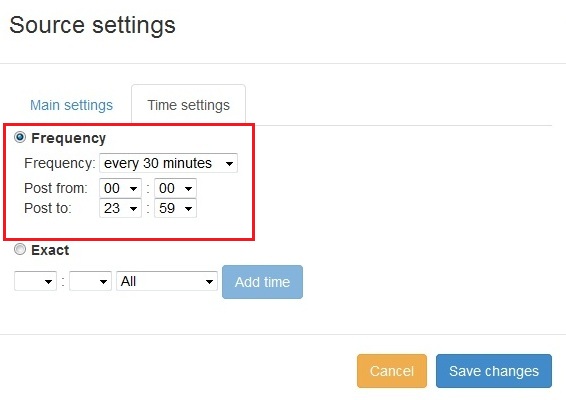
PostRSS'e yeni özellik eklendi: Gelişmiş paylaşım zamanı seçimi
Güncellendi: 2015-11-11

  New feature added to PostRSS Advanced posting time selection. No source from Advanced time settings Possible to add i...

Devamını oku »

Sosyal medya hesabınızı PostRSS uygulamalarıyla nasıl senkronize edersiniz?
Güncellendi: 2015-11-03

We receiving many questions: How to synchronize social my accounts? I am don't see my Facebook page in listings? How po...

Devamını oku »
Facebook'ta Büyük Görsel Önizlemeli Bağlantı Nasıl Paylaşılır?
Güncellendi: 2026-08-26

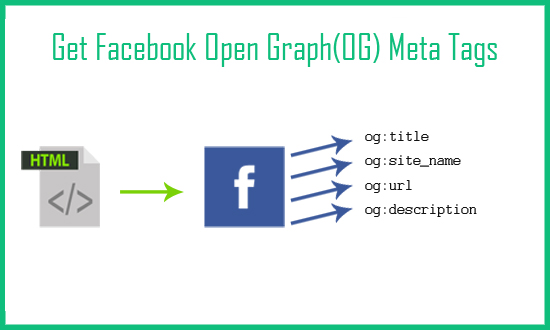
Today I will show you how to fetch facebook Open Graph (OG) meta tags with php script. Open Graph meta tags are used in html pa...

Devamını oku »

PostRSS Plans for Every Size: From Solo Start to Enterprise 5000
Güncellenme tarihi: 2026-08-30

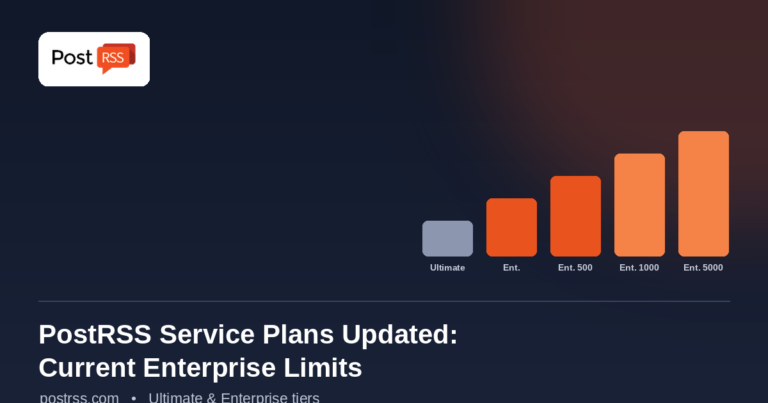
Updated: 2026-08-20 This post originally announced two additions to PostRSS's pricing lineup back in June 2015: a S...

Devamını oku »
Daha fazla makale yükleniyor…
Menü
x
PostRSS - RSS Besleme Otomasyon Platformu ve Otomatik Paylaşım Aracı
Gizlilik Genel Bakış

Bu web sitesi, size mümkün olan en iyi kullanıcı deneyimini sunabilmek için çerezler kullanmaktadır. Çerez bilgileri tarayıcınızda saklanır; web sitemize geri döndüğünüzde sizi tanımak ve ekibimizin web sitesinin hangi bölümlerini daha ilgi çekici ve yararlı bulduğunuzu anlamasına yardımcı olmak gibi işlevler görür.